|
|
|
|
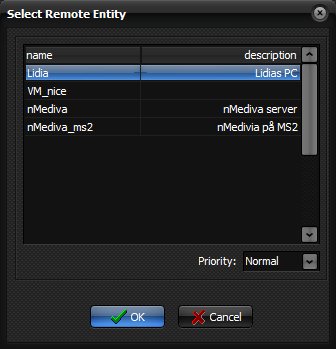
Select
Remote Entity
The Select
Remote Entity dialog The Select Remote
Entity dialog can be displayed by pressing the Send button on the Database
tab of the nordicICE database dialog.
Priority: Gives the priority of this transfer. Set this to highest to make
the transfer interrupt any ongoing transfer, and be sent immediately, or set
it to lowest to make it wait until there are no other images to be sent.
Leaving it at Normal priority will put it in the default transfer queue, and
it will be sent when all transfers registered before it has been sent. : Closes the dialog and sends the images. Cancel: Closes the dialog without sending any images. Related topics:
Database
tab
|
|