|
|
|
|
Co-registration
panel (MPR)
Automatic
co-registration
Automatic
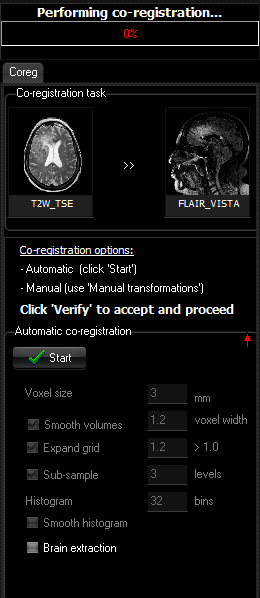
Co-registration Parameters Voxel size Both volumes are re-sampled onto the same uniform grid. This
parameter determines the distance between grid points along each of the axes.
Smooth volumes / width
The match between the two volumes is expressed as a cost
function, and the problem of finding the optimal transformation is equivalent
to finding the minimal value of this cost function. Smoothing can help
avoiding locally minima but could also cause misalignment because information
in the pixel values is lost. Gaussian smoothing is used, and the filter width
is given by the width parameter (in voxel units). Expand grid / size If there is a large mismatch between the reference and the
source volume, it would help to expand the uniform grid. The size of the grid
is expanded by the given factor in each direction. Sub-sample / levels Sub-sampling is like smoothing, but with the benefit that
computation time is much lower on the sub-levels because of the reduced
number of grid points. Histogram The number of histogram bins. The histogram is used in the
calculation of the mutual information cost function. Smooth histogram Has the same effect as choosing a smaller number of histogram bins. Brain extraction When co-registering functional to structural data, the results
are much more accurate when the scull is stripped from the structural volume.
Manual co-registration
panel
The co-registration
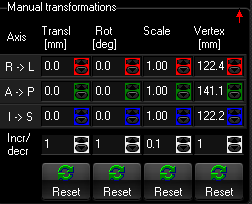
panel contains the following controls: Manual transformation
parameters R -> L (Transl) Translation along the R-L axis. (Rot) Rotation around the R-L axis. (Scale) Scaling along the R-L axis. (Vertex) Vertex component along the R-L axis. A -> P (Transl) Translation along the A-P axis. (Rot) Rotation around the A-P axis. (Scale) Scaling along the A-P axis. (Vertex) Vertex component along the A-P axis. I -> S (Transl) Translation along the I-S axis. (Rot) Rotation around the I-S axis. (Scale) Scaling along the I-S axis. (Vertex) Vertex component along the I-S axis. Incr/decr (Transl) Increment/decrement when using the up and down arrows to modify
translation. (Rot) Increment/decrement when using the up and down arrows to modify
rotation. (Scale) (Vertex) Increment/decrement when using the up and down arrows to modify
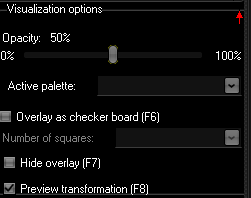
vertex components. Reset (Transl) Reset applied tranlations. (Rot) Reset applied rotations. (Scale) Reset applied scales. (Vertex) Reset applied vertex components. Visualization options
|
|