Image
Header Edit
The Edit
fields dialog
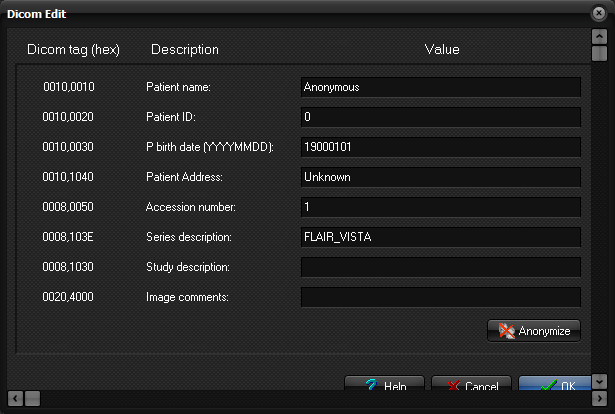
Here you can edit the values used to replace sensitive information during
anonymization. You can also specify whether to do a thorough anonymization,
or a simple un-identification.
Patient name:
Check this to have the patient name replaced by the
"Value".
Patient ID:
Check this to have the patient id replaced by the "Value".
P birth date(YYYYMMDD):
Check this to have the patient birth date replaced by the
"Value". The birth date must be on the format YYYYMMDD, e.g.
19010131
Accession number:
Check this to have the accession number
replaced by the "Value".
Series description:
Check this to have the series description replaced by the
"Value".
Study description:
Check this to have the study description replaced by the
"Value".
Image comments
Check this to have the image comments replaced by the
"Value".
All other tags:
Check this to anonymize oll other tags, removing or replacing
all possibly sensitive tags and values. Most private tags will be removed,
keeping only those relevant to nordicICE analysis methods.
Uncheck this to only replace the tags checked and edited in this
Dialog, leaving the rest of the tags with their original values. In any case
the SOP instance UID, Series Instance UID and Study Instance UID will be
replaced to avoid images with different headers to have the same UID.
Delete original
images from database:
Check this to delete the original images from the database,
after inserting the anonymized images. This option is only available when
performing an anonymization directly in the database.
Note: The Edit
fields dialg can be displayed by pressing the Anonymize button on
the Database tab of the nordicICE database dialog.
Tips:
- Edit a single tag by changing this ones value, and
making sure that no other tags are marked for anonymization.
Related topics:
Database tab
DICOM database
|