|
|
|
|
ROI
from Grayscale Segmentation
The
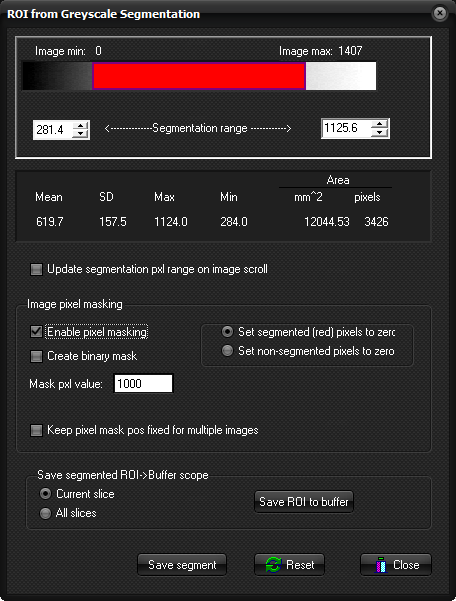
ROI from Grayscale Segmentation dialog box is displayed when selecting
Segmentation ... from the Process menu.
The Segmentation
dialog window enables dynamic modification of the pixel thresholding values
as well as other relevant ROI related options. The red bar indicates the
pixel level which is currently segmented (note the segmentation color is
always red). The threshold can be adjusted interactively by right-clicking on
of the edges of the bar and dragging it to the left/right to expand/reduce
the length of the bar. The length of the color bar then reflects the range of
segmented pixels which is also reflected in the editable number boxes in
either end of the threshold bar. The upper/lower segmentation values can be
edited manually by entering the appropriate values in the boxes. The numbers
above the boxes indicate the maximum and minimum pixel values in the current image.
It is also possible to generate a segmented version of the input data according
to the segmentation settings and further so copy the segmented pixels to the ROI buffer. Update
segmentation range on image scroll: The max values
is updated according to the maximum pixel value in the current slice. If not
checked, the max value will remain fixed on image scroll
Image
pixel masking:
Enable
pixel masking: when selected, the input data will be
modified upon exiting the segmentation tool to reflect the segmentation
settings.
Create
binary mask: when selected, foreground pixels (that
is red pixels) are set to a fixed value as specified in the <mask
pxl value> field
Keep
pixel mask pos fixed for multiple images: as default, the
mask is update for each slice according to the max pixel values in that
slice. When this option is checked, the mask is kept the same for all slices
in the input series and in accordance with the segmentation status at exit.
Save segmented ROI->Buffer scope:
: The segmentation setting will only be
applied to the current slice. Save
ROI to buffer: Save the segmented
pixels as a scatter ROI to a ROI buffer. Save
segment
The segmented pixels
are save as a single ROI file (with extension Reset
Resets the segmentation range to default values. Related topics:
|
|