|
|
|
|
ROI
Mask
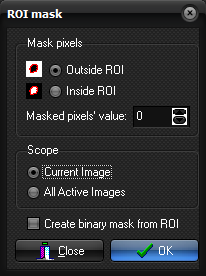
Mask pixels Outside ROI / Inside ROI When Inside ROI is selected, the pixels inside the ROI
are masked. The pixels outside the ROI are left unchanged. Masked pixels' value The value to replace the masked pixels with. Scope Current image / All Active Images Mask the pixels only in the current image of the active image
window. For single dimensional, the All active images option will mask
all images. For multi-dimensional series the All active images option
will mask all images for the currently active series (as shown in the Scroll:
drop-down box). The other series will not be masked. Create binary mask from ROI When this option is checked, the non-cleared pixels are all set
to 1, thereby creating a binary mask. (i.e. one inside the ROI and zero
outside). Note:
The ROI Mask dialog box is displayed when you select ROI -> ROI
Mask ... from the Measure menu Related topics:
ROI
masks
|
|