|
|
|
|
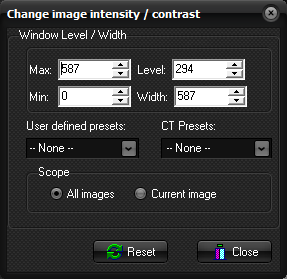
Change
image intensity / contrast
Window Level / Width Level: the
centre value of the displayed image intensity range Width: the
width of the displayed image intensity range Max: maximum intensity Min: minimum intensity CT Presets: Standard CT window ranges (based on Hounsfield
units) for different tissue types User Defined presets: Option for user-defined window settings. These
settings are specified under Options->Settings->Win L/W Presents from
the main menu bar Scope All images: The
window settings are applied to all images in the loaded series Current image: Only current image is affected Note:
The Change image intensity / contrast dialog box is displayed when you
choose the Intensity / Contrast ... command on the Modify
menu Tips:
Related topics:
Image
contrast/intensity
|
|