|
|
|
|
ROI
statistics
The ROI
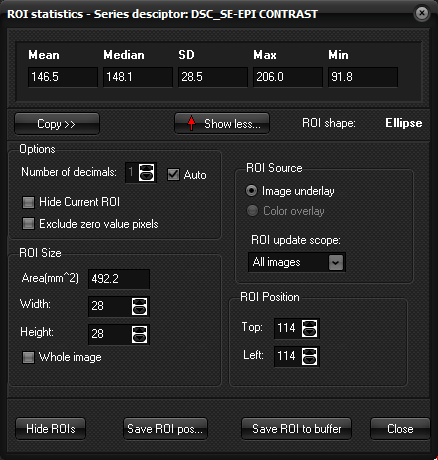
Statistics window The ROI statistics dialog box is
displayed when you choose the ROI ->Measure command on the Measure
menu or when you choose ROI -> View -> ROI Statistics
from the Measure menu.
ROI Size / ROI
Position For rectangular and elliptical ROI s, the ROI size is displayed
in the window. For other ROI types, this information is grayed out. Note that
the ROI size and position can also be changed using the scroll bars to he
right of each parameter. Whole image Exand the ROI shape to the image borders. ROI Source Determines whether the ROI operation should be applied to the
image overlay or the underlay (default). The image underlay is here
equivalent to the loaded image set if no overlay is present. Hide Current ROI Temporarily hides the current ROI Exclude zero value pixels Exclude pixels with a value of zero from the statistical ROI
analysis. Since some functions in nordicICE will set
pixel values to zero in response to certain criteria, this is a means of
excluding such pixels from the ROI analysis. Active ROI shape: Displays the name of the ROI type that is active. ROI statistics: Displays the mean, standard deviation, max, min and median
pixel values in the current ROI as well as the ROI area and volume. Note
that, by default, the drawn ROI is applied to all the images in the volume
and the volume of interest (VOI) is therefore, by default, calculated as ROI
x slice thickness x No. of slices. The ROI shape, size and position can,
however, be individually adjusted for each slice. See “ Advanced ROI functionality ”
for more details. ROI Update Scope: Determines which images a given change in the current ROI is
applied to. This is convenient if a given ROI should be applied to a subset
of the images (e.g. current image to last image or current image to first
image or just current image). : Removes multiple ROI s according to the setting of the ROI update
scope parameter. : Adds the active ROI to the ROI Buffer, as described in “ Saving ROI data
to the Buffer ”. Save ROI pos: Saves the ROI object as a .roi file. This
option allows a given ROI to be loaded back with the same properties (shape,
size, position) as when it was saved. Related topics:
Region of interest (ROI) Analysis
|
|