Gaussian
Smoothing
The Gaussian Smoothing dialog
box is displayed when selecting Gaussian Smoothing ...
from the Process menu
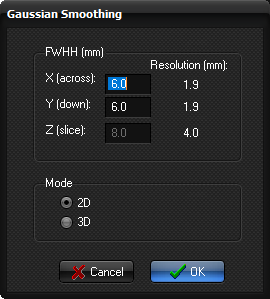
FWHH (mm): here you specify the full-width half-height in
all three dimensions (X,Y,Z) of the Gaussian kernel,
where X,Y is the in-plane values and Z the through-plane (slice-direction)
value
Mode
2D: a 2D kernel is applied
(no smoothing in the Z-direction)
3D: a 3D kernel is applied
(smoothing in all three directions)
Note:
The kernel is specified in mm, which assumes that the spatial resolution of
the input data is known. The resolution as detected by nordicICE is shown
next to the edit field for each dimension.
Related topics:
Smooth

|