|
|
Fibers tab
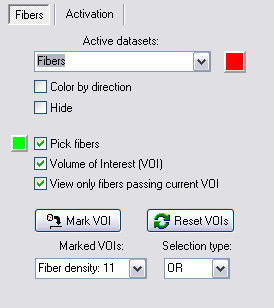
- Active datasets:
- Show the current active reconstructed fiber datasets. The color associated with the selected dataset is displayed to the right
- Active dataset color button:
- Displays the color used for
rendering the selected dataset. Press this button to display the
color dialog. You can change the color used for displaying the selected
dataset by selecting a different color in the color dialog.
- Color by direction:
- Color the fibers according to direction of the
diffusion tensor.
- Hide:
- Hide the current selected dataset.
- Pick fibers:
- Enable
interactive fiber selection. When enabled, hold down the SHIFT button
and click on the fibers of interest in the 3D window.
- Active fiber color button:
- Displays the color used for
rendering the selected fiber. Press this button to display the
color dialog. You can change the color used for displaying the
selected fiber by selecting a different color in the color dialog.
- Volume of Interest
(VOI):
- Enable VOI-box in the 3D window. The
VOI-box can be moved around freely and resized within the image volume.
The box is moved by holding down the middle mouse button over the box.
By holding down the left mouse-button on one of the spheres-handles the
box-sides, the box can be resized. The box can also be resized by
clicking and holding down the right mouse-button over the box.
- View only fibers
passing current VOI:
- Enabled interactive selection of fibers when moving
the VOI-box. When
enabled, only fibers that pass through the current VOI are displayed.
- Mark VOI:
- Mark current VOI-box with a logical
attribute (AND/OR/NOT). A
corresponding entry in the Marked
VOIs and Type
drop-down menus will appear.
- Reset VOIs:
- Clear all currently marked VOIs.
- Marked VOIs:
- Drop-down menu showing all VOIs that has been marked
with Mark VOI.
Each entry in the menu has a text string describing the fiber density,
i.e. the number of reconstructed fiber tracts that pass through the
respective VOI.
- Type:
- The logical attribute of the current selected VOI:
- AND: Require all fibers to pass through this VOI
- OR: Keep all fibers passing though this VOI
- NOT: Disregard all fibers passing through this VOI
Related topics:
Tractography 3D viewer

|
|