|
|
Batch
Analysis - Pre-Process
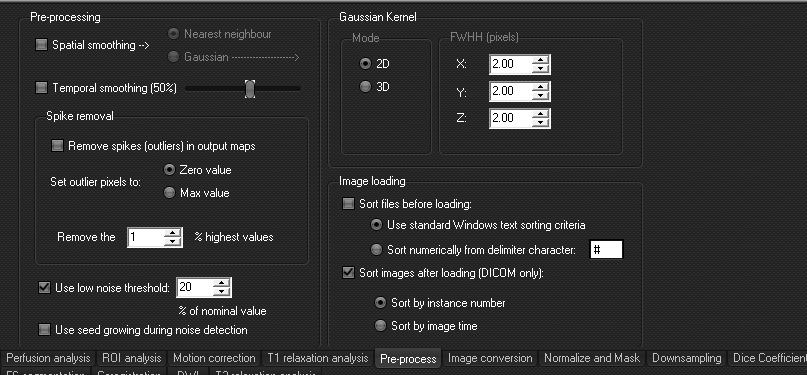
This
is the only tab where there is no analysis to be run, i.e. hitting 'Process'
when this tab is active will not start any processing. The settings on this
tab is used by all the other analysis processes in the batch module. Thus, it
is very important to check that the settings on this tab are in correspondence
to what you want to use in your analysis.
Image loading
It
is very important to make sure that the images are sorted correctly. As the
input data can vary greatly between studies/scanners/sites etc., the user
must verify that the settings used are correct for his data. If these
settings are changed, and the analysis is run, the new setting will be kept,
also after the application is closed and re-opened.
Any
type of data (DICOM, nifti) can be sorted before loading using either
standard Windows text sorting criteria, or numerically (image#001, image#002,
image#003,...).
For
DICOM data, images can be sorted after loading. Sort by instance number seems
to work for most MR DICOM data.
Always check that the order of the loaded data is correct before
running a large batch analysis!
Pre-proccessing
- Spatial smoothing
can be done using either Nearest neighbour or Gaussian. For Gaussian
smoothing, you can specify if you want to run 2D or 3D, and which
smoothing kernel to use (FWHM in pixels).
- Temporal smoothing
can be done on dynamic data.
- Spike detection
can be done to remove outliers in the output maps.
- Low noise threshold can be used to reduce the level of the automatic
noise threshold that is used in the analysis. This can be useful in
cases where the baseline signal is low, causing the automatic noise
threshold to be too high. If this is set to 0%, it means that no noise
thresholding is used (all pixels in the image is included in the
analysis).
- Seed growing during noise detection will use a seed
growing technique from the a pixel above the noise level in the center of
the image and find connecting pixels from here. This will be useful to
remove 'non-brain' voxels that are not connected to the brain region.

|
|