Image
Zoom / Pan
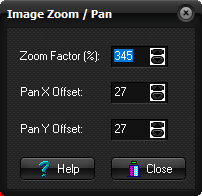
Displays
the current Zoom and Pan values. The dialog can also be used to modify the
same values.
Zoom factor (%):
Shows the current magnification in % of the original image,
within 20% -800%. Magnification is done in steps, so that not all values are
permitted.
Pan X Offset:
Shows the displacement in the horizontal direction in original
pixels
Pan Y Offset:
Shows the displacement in the vertical direction in original
pixels.
Note:
The Image Zoom / Pan dialog box is displayed when you choose the Zoom/Pan
Info ... command on the View menu.
Tips:
- Press the Zoom image button
 or Pan image button or Pan image button  to
enable interactive modification of Zoom and Pan values, respectively. to
enable interactive modification of Zoom and Pan values, respectively.
Alternatives:
- Zooming and panning can be done using the mouse. See Zoom and Pan.
Related topics:
Zoom
Pan
|