Configuring
the brain extraction parameters
When
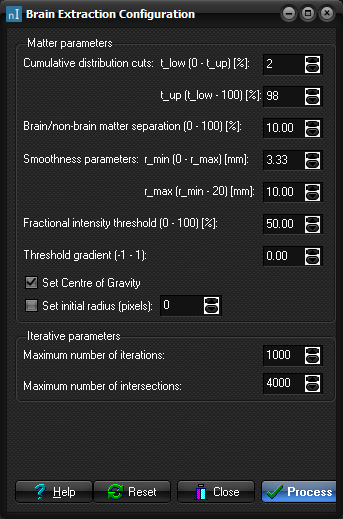
you select Brain extraction on the menu line the Brain Extraction
Configuration window appears.
Configuring
brain extraction parameters.
Parameter
configurations for brain extraction.
As
a rule of thumb, you should first try to run brain extraction with the
default parameters. For most image series the default parameters lead to a
good fit of the brain surface.
In
some cases, it may be necessary to modify certain parameters. The first group
of entries is called Matter
parameters. This group contains tuneable parameters for the
selection brain and non-brain tissue. Ranges of allowed parameters are given
as (low - up) .
Cumulative cuts:
There is an upper and a lower cumulative cut, t_low (0 - t_up)
[%] and t_up (t_low -
100) [%] respectively. The unit for these parameters is %. These
cuts are used in order to remove a small number of
voxels whose intensity values are very different from the rest of the image
series. I.e. a fraction of size t_low in the low end of the
intensity spectrum and a similar fraction of size t_up in the upper end of the
spectrum are not considered in the fitting procedure.
Brain/non-brain matter
separation (0 - 100) [%]:
In many MR image bone tissue appears dark. This value is chosen
as a rough initial separation between brain tissue (above) and
"background" (below). The value represents a fraction of the range
between t_low (0 - t_up)
and t_up (t_low -
100) and is given in units of %.
Smoothness parameters:
There are two parameters that determine the smoothing of the
mesh surface, r_min (0 - r_max)
[mm] and r_max (r_min - 20)
[mm] .
The unit for these parameters is mm. Structures with radii of curvature < r_min are
heavily smoothed while structures with radii > r_max experience little
smoothing. The amount of smoothing follows a sigmoid function of radius of
curvature.
Fractional intensity
threshold (0 - 100) [%]:
This parameter represents a fraction of the intensity threshold
that separates brain tissue from background in the later stages of the
fitting. The iterative update of the tessellated mesh along directions given
by surface normals is guided by this parameter.
Threshold gradient (-1
- 1):
The amount of iterative update of the tessellated mesh along
directions given by surface normals is guided by
this parameter.
Set Centre of Gravity
By default, the centre
of gravity used to initiate the iterative search of the image volume is
automatically estimated from the input data. If the image volume includes
large non-brain regions (e.g. neck), the iteration
may not easily converge to a correct extraction of brain. This option enables
manual selection of centre of gravity region as well as the initial radius of
the search region (see figure below)
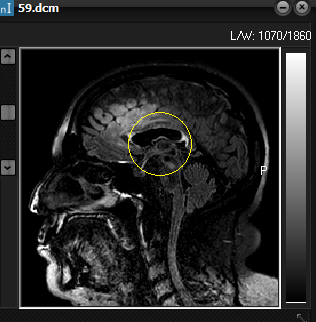
Figure 1. Setting size and position
of initial search area (‘centre of gravity’ option)
There
are two parameters that control the iterations of the brain extraction
algorithm.
Maximum number of
iterations:
The maximum number of steps used to fit the brain volume.
Maximum number of
intersections:
The maximum number of surface self-intersections allowed before
refitting the brain surface.
The
Help button
leads you to this user’s manual. Upon choosing a set of parameters you may
return to the default values by pressing the Reset button. You may close the brain
extraction configuration by pressing Close.
When you want to start extracting the brain you press the Process button.
|